EVGA’s CLC 120 cooler fell on our bench shortly after the EVGA CLC 280 ($130), which we reviewed last week against the NZXT X62 & Corsair H115i. The EVGA CLC 120 prices itself at $90, making it competitive with other RGB-illuminated coolers, but perhaps a bit steep in comparison to the cheaper 120mm AIOs on the market. Regardless, 120mm territory is where air coolers start to claw back their value in performance-to-dollar; EVGA’s chosen a tough market to debut a low-end cooler, despite the exceptionally strong positioning of their CLC 280 (as stated in our review).
Before diving in to this review, you may want to read the EVGA CLC 280 review, NZXT Kraken X42/X52/X62 review, or its subsequent tear-down.
EVGA CLC 120 Specs
The EVGA CLC 120 is simple in all aspects: It’s an Asetek Gen5 pump, features the same copper coldplate with the same microfin density as we’ve seen in the past, and uses the usual propylene glycol mixture of coolant. The fan is different, axing the cowling in favor of… something – we suspect noise, though it seems more like a mistake. Testing did validate that performance is the same with and without that casing, granted, but it’s just an odd move. The point is, though, that the fans are really the only differentiating factor – and even those perform equivalently to less flamboyant options – aside from the RGB-illuminated pump plate. If that’s what you’re into, NZXT still does it best, though EVGA is now stepping between NZXT and Corsair to offer a mix of what each company sells in their product lineups.
This version of the cooler ships in a 120mm size, using a fan that reaches 2500RPM at the top-end of the range. The 280mm variant uses 140mm fans that max out around 2200RPM.

The CLC 120 is also priced lower, at $90 versus the $130 EVGA CLC 280. NZXT doesn’t make an official 120mm cooler, leaving their X42 140mm unit the closest competition at $130 – a staggering $40 increase over EVGA’s 120 CLC. We need to get a few more 120 and 140mm coolers to really expand testing, but for today, we can look at how the EVGA CLC 120 compares to larger radiator coolers. Air coolers are on the ever-growing to-do list for future testing.
Tear-Down
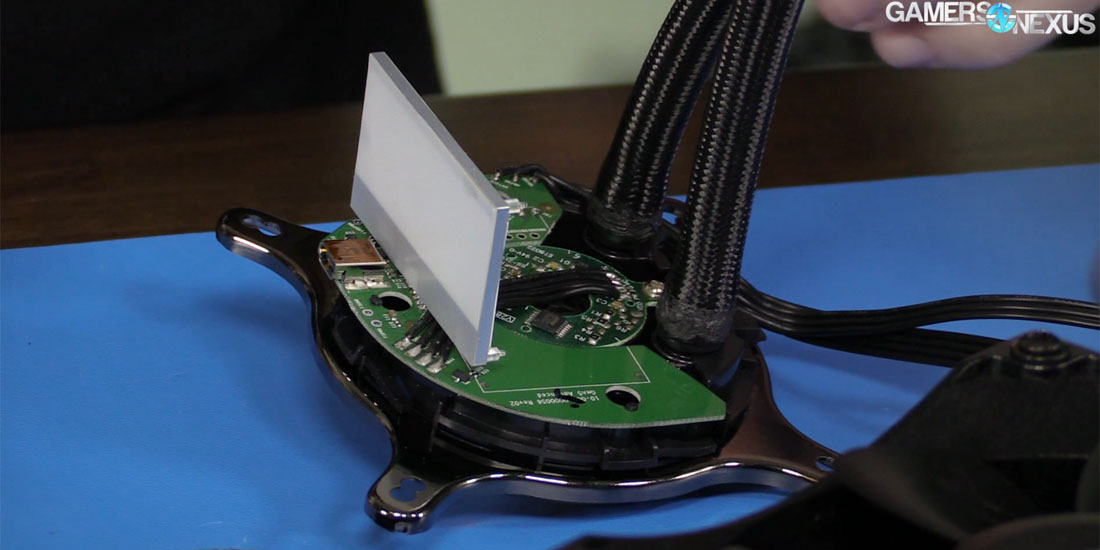
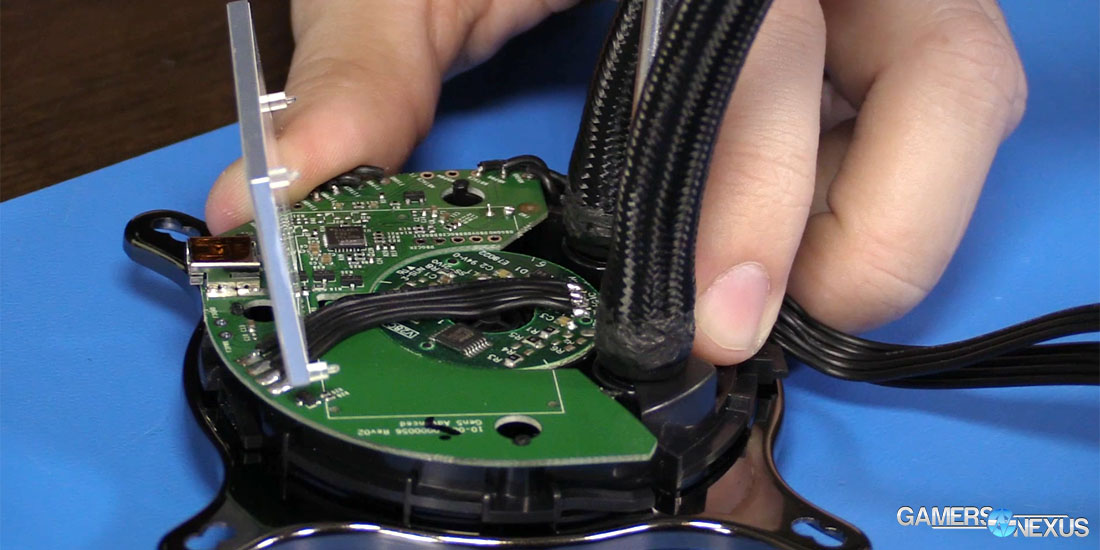
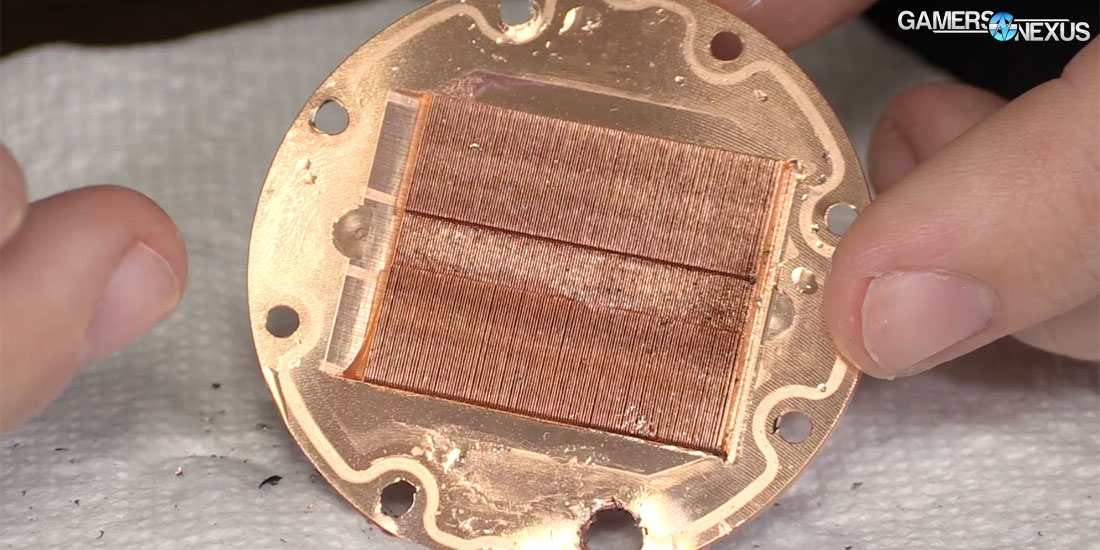
The above photos were published in our EVGA CLC 280 review, but technically come from the EVGA CLC 120 – they’re the same in the pump, though. The cooler uses an Asetek Gen5 pump, copper coldplate with microfins to increase surface area, and a propylene-glycol coolant for dissipation. Pump speed is not controllable by the user, unlike the Kraken coolers, and the impeller is the usual three-finned electromagnet that we’ve seen countless times before.
Within the pump housing rests a foam damper for handling noise, along with a diffuser plate for evening the distribution of the RGB LED backlighting. EVGA’s PCB is more similar to Corsair’s than to NZXT’s, meaning it’s almost certainly an Asetek design start-to-finish. That said, EVGA does permit firmware updates by the end user, and also permits user profile storage on the device. This means that you could configure the RGB LEDs as desired, then disconnect the cable; the lights would remain on the pump plate.
CPU Cooler Testing Methodology
CPU cooler testing is conducted using the bench defined below. We use a bench that is more carefully crafted for noise performance, opting for a passively cooled PSU and 23% RPM 980 Ti blower fan for very low system noise.
We strongly believe that our thermal testing methodology is among the best on this side of the tech-media industry. We've validated our testing methodology with thermal chambers and have proven near-perfect accuracy of results.
Conducting thermal tests requires careful measurement of temperatures in the surrounding environment. We control for ambient by constantly measuring temperatures with K-Type thermocouples and infrared readers. Two K-Type thermocouples are deployed around the test bench: One (T1) above the bench, out of airflow channels, and one (T2) approximately 2-3" in front of the cooler's intake fan. These two data points are averaged in a spreadsheet, creating a T3 value that is subtracted second-to-second from our AIDA64 logging of the CPU cores.
All six CPU cores are totaled and averaged second-to-second. The delta value is created by subtracting corresponding ambient readings (T3) from the average CPU core temperature. We then produce charts using a Delta T(emperature) over Ambient value. AIDA64 is used for logging thermals of silicon components, including the CPU and GPU diodes. We additionally log core utilization and frequencies to ensure all components are firing as expected. Voltage levels are measured in addition to fan speeds, frequencies, and thermals.
The cores are kept locked to 3.8GHz (x38 multiplier). VCore voltage is locked to 1.141v for the CPU. C-States are disabled, as is all other power saving. The frequency is locked without any interference from boost or throttle functions. This is to ensure that the CPU does not undergo any unexpected/uncontrollable power saving or boost states during testing, and ensures that the test platform remains identical from one device to the next.
Fan speeds are manually controlled unless otherwise defined. For liquid coolers, pumps are set to 100% speed unless otherwise defined.
No open bench fans are used for these CPU cooler tests. Only fans which are provided with the cooler are used.
| GN Test Bench 2015 | Name | Courtesy Of | Cost |
| Video Card | GTX 980 Ti Reference 23% RPM | NVIDIA | EOL |
| CPU | Intel i7-5930K CPU @ 3.8GHz | iBUYPOWER | $580 |
| Memory | Corsair Vengeance 32GB 2666MHz | Corsair | $175 |
| Motherboard | EVGA X99 Classified | GamersNexus | $365 |
| Power Supply | Enermax DigiFANLESS | Enermax | $250 |
| SSD | HyperX Savage SSD | Kingston Tech. | $130 |
| Case | Top Deck Tech Station | GamersNexus | $250 |
| CPU Cooler | This is what we're testing! | - | - |
We use an AMPROBE multi-diode thermocouple reader to log ambient actively. This ambient measurement is used to monitor fluctuations and is subtracted from absolute GPU diode readings to produce a delta value. For these tests, we configured the thermocouple reader's logging interval to 1s, matching the logging interval of GPU-Z and AIDA64. Data is calculated using a custom, in-house spreadsheet and software solution.
Our test starts with a 180s idle period to gauge non-gaming performance. A script automatically triggers the beginning of a CPU-intensive benchmark running Prime95 LFFTs. Because we use an in-house script, we are able to perfectly execute and align our tests between passes.
Continue to Page 2 for Temperatures, Noise, & Conclusion.
EVGA CLC 120 Temperatures
As with last time, let’s first start with just EVGA’s CLC coolers for temperatures, then add the others. We’re seeing the EVGA 280mm CLC at 1050RPM outperform the EVGA 120mm CLC at its maximum fan RPM of 2500, with about a 1.2C difference between them. Keep in mind that our variance is about 0.5C.
Dropping down to a more reasonable fan speed, the EVGA 120 CLC at 1500RPM posts a load temperature of 50.92C delta T, now about 10C warmer than the 39.5C delta T 280mm temperatures when at a 1050RPM fan speed. Finally, the 1050RPM EVGA 120mm unit operates with an idle temperature of 11.4C delta T and a load of about 57C delta T, or somewhere nearing 80C if we were to add ambient back in.

If you’re curious, we also tested the cowling depth with the 280mm cooler to see if the fan casing made any real difference, and the short answer was that it didn’t. Performance is about equal with the extra cowling depth as without it.
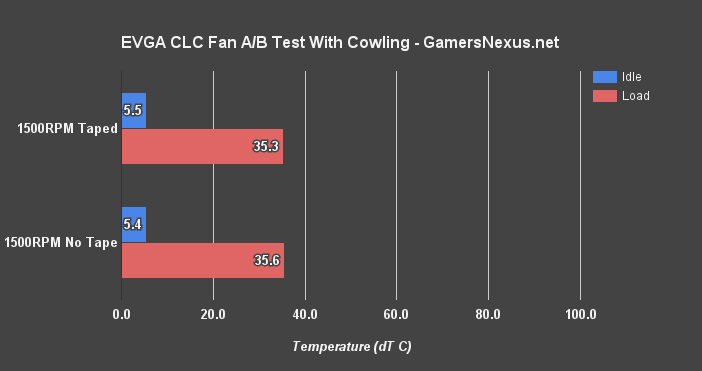
(Above test with CLC 280)
EVGA CLC vs. NZXT Kraken Coolers (X42, X52, X62)

And just like last time, let’s now add NZXT back into the results. NZXT’s closest competition is the Kraken X42 ($130), but the price is so much higher that they’re not really head-to-head in terms of target market. The X42 at 1050RPM outperforms EVGA’s CLC 120 at 1500RPM by about 4C, showing a clear advantage in noise to performance from the extra radiator size and different fan design. The X52 uses 120mm fans, but two of them on its 240mm radiator. We’re able to run the X52 at 800RPM and achieve a slightly better performance-to-noise profile than the EVGA CLC 120 at 1050RPM, but again, you’re dealing with a major price hike to the X52.
EVGA CLC 120 Benchmark [All Coolers]

The EVGA CLC 280 is still at the top, and is still exceptionally loud. It’s not until way down the list that we get to the smaller 120mm radiator, which first makes an appearance right around the 1700RPM X42 NZXT cooler at 40.78C delta T. The more reasonable 1500RPM version of our test places the EVGA 120 CLC at 50.92C delta T, only marginally better than the one air cooler presently on our bench. We’ll have to add more of those soon.
EVGA CLC 120 Noise Levels

Finally looking to the noise table, we see the EVGA CLC 120 landing between the X42 at 1050RPM and the H100i at 1050RPM when running with an equivalent fan speed. This makes sense, since the H100i has similar 120mm fans. Strictly from a noise perspective, the performance to volume is better with the larger radiators, but your cost also increases substantially.
Moving to the EVGA CLC 120 at 1500RPM, which is where it’s most likely to be used, we’re resting right at 40.7dBA – comparable to the Dark Rock 3 at 2000RPM and EK Predator 280 at 1400RPM.
The 2500RPM EVGA CLC 120 is unbearably loud with a 53.9dBA output, just like its neighboring 50+ dBA coolers.
Conclusion: Skip the EVGA CLC 120

Where the EVGA CLC 280 ($130) makes a lot of sense in its price and performance category, the EVGA CLC 120 is a much tougher sell. The price, compared to 140mm options from Corsair and NZXT, is competitive – but that’s not enough. You could match performance with the CLC 120 with a decent air cooler – something for which we’ll soon publish data – and the noise profile isn’t that much better.
If you can fit a larger 240mm radiator, Corsair’s H100iV2 ($100) makes infinitely more sense than EVGA’s CLC 120 and is priced $10 more, the only differences being form factor and LEDs. If the 240mm H100iV2 won’t fit, and if you really want those RGB LEDs that EVGA has, then maybe the EVGA CLC 120 is a worthwhile consideration. More likely, though, you’re better off either going with a high-end air cooler, the 140mm X42, or (we think) the Corsair H100iV2 at $100. The EVGA CLC 280 was an exceptionally strong entrance to the AIO market for EVGA. The 120 doesn’t help that image quite as much, and it’s probably best ignored.
Editorial: Steve Burke
Video: Andrew Coleman